Tools · Tables
Turn a table photo into a CSV.
Choose a photo, let Tables fill in the cells, then check and save. The draft sits beside your image so you can correct the text and layout before opening the CSV in a spreadsheet.
The page from the app, on prepared samples. Its answers were recorded on a Mac and are replayed, so only the prepared examples work. It cannot open a file of yours, and it needs JavaScript.
From image to cells
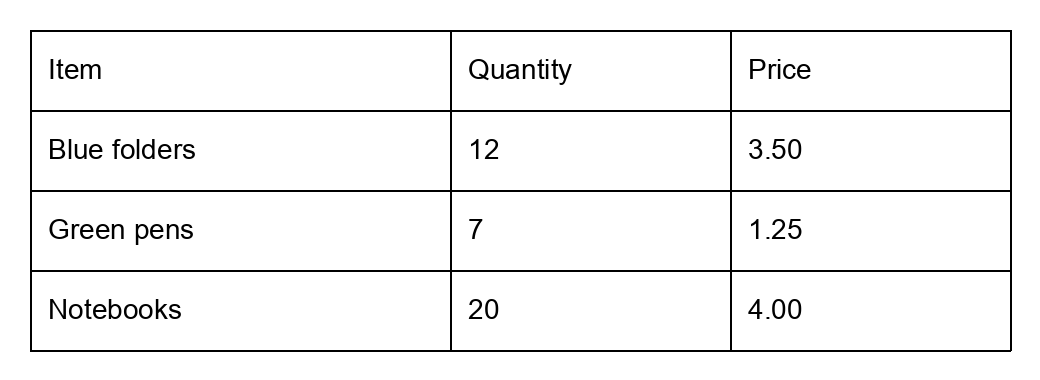
The draft the reader returned
| Item | Quantity | Price |
|---|---|---|
| Blue folders | 12 | 3.50 |
| Green pens | 7 | 1.25 |
| Notebooks | 20 | 4.00 |
All 12 cells matched the authored truth, including the space in “Blue folders”. Nothing needed correcting.
The CSV after review
"Item","Quantity","Price"
"Blue folders","12","3.50"
"Green pens","7","1.25"
"Notebooks","20","4.00"
Rows end with CRLF. Spreadsheet software may still reformat dates or leading zeroes on import; import those columns as text when needed.
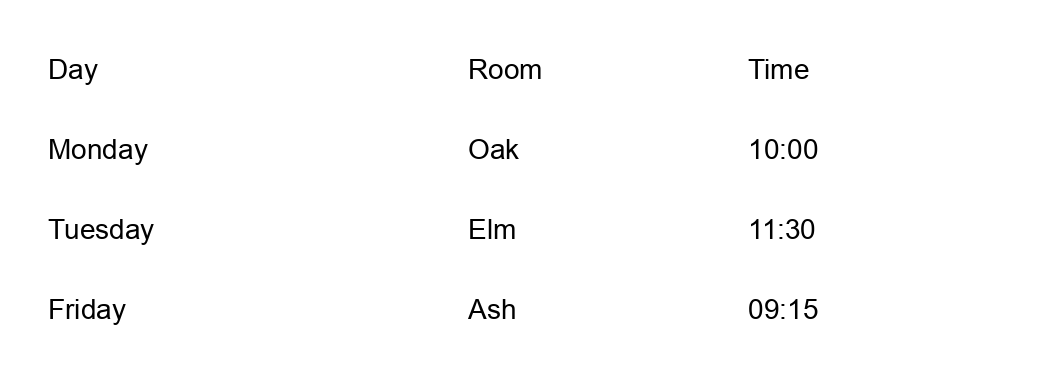
Where the reader was wrong
Draft returned
| Day | Room | Time |
|---|---|---|
| Monday | Oak | 10:00 |
| Tuesday | Elm | 11:30 |
| Friday | Ash | 09:15 |
| empty cell | empty cell | empty cell |
Every expected cell matched, and the reader added one empty row after the last booking. A person would remove row 5 before ticking the review box. The scorer counts this table as not exact.
Authored truth
| Day | Room | Time |
|---|---|---|
| Monday | Oak | 10:00 |
| Tuesday | Elm | 11:30 |
| Friday | Ash | 09:15 |
The intended content of the image, written before the reader ran.
What happens
- Choose an image. One still JPEG, PNG or WebP, up to 15 MB and 25 million pixels. Rotate in 90° steps and trim the edges so only the table remains. The preview shows exactly what will be read.
- Read it. The reader finds the table structure and the text in each cell on your CPU. It refuses merged or irregular cells rather than flattening them, and shows an error you can retry.
- Check every cell. The draft grid sits beside the image. Every cell is an editable field. Cells the reader moved during alignment are marked Check text position, which describes changed placement, not confidence. Add or remove rows and columns if the structure is wrong.
- Tick and save. Any edit clears the review checkbox. Once you tick that you have checked every cell, save as CSV. Every cell is quoted, empty cells stay empty, and text that could act as a spreadsheet formula gets a leading apostrophe.
Bank statements as PDFs
Tables also reads a statement you have downloaded from your bank as a PDF. There is no model for this and no crop step. Ordinary code reads the words and where they sit on the page, finds the columns of amounts, copies a blank date down from the row above, and uses the printed running balance to tell money in from money out. The rows appear next to images of the pages, like a table photo.
Where a printed balance does not add up, that row is marked for you to check. When every balance adds up, Tables says so. That checks the amounts, not the dates or descriptions, so every cell still needs checking.
The CSV copies the page rather than interpreting it. The columns are date, the text columns numbered in page order, paid out, paid in and balance. Brought-forward and carried-forward lines stay as rows with only a balance. Amounts are saved without £ or commas, and an overdrawn balance is negative.
The rules name no bank. Before building this I tried them on six of my own statements from two banks, on my computer: every printed balance added up, and I checked a page from each bank by eye. The second bank’s layout only worked after I adjusted the rules on it, and a third bank is untested. I have since used it on a real statement from download to saved CSV: it took about 20 seconds, and a couple of cells needed correcting. A statement can have up to 30 pages and 500 rows. Scanned PDFs are not read.
A year of checked statements is what Regulars reads. The route is written up as the playbook A year of statements.
Which tables to start with
Start with a clear, upright, tightly cropped image of one printed table in English, with no merged cells. Two cropped phone photographs of printed examples were read correctly in the latest check. Handwriting, strong tilt, blur, small type, spanning headings and larger layouts remain unproven. The reader can miss spaces, misread numbers or add empty rows, and a wrong layout can still look rectangular, so every cell needs checking, marked or not.
Limits of the reader and the review
The reader is limited to 180 seconds, and the draft to 100 rows, 20 columns and 2,000 characters per cell. Alignment orders recognised fragments within a cell, joins them with spaces and trims outer whitespace. Text whose centre is above or below the detected table is excluded, so a mistaken table boundary can omit source content.
Rotation and cropping help locate the table; they do not establish that its cells are correct. Cropped images are prepared as PNG in browser memory and the original file is unchanged.
There is no result history. Clearing removes the in-memory grid and image. A CSV you download remains wherever your browser saves it.
Models used
For a PDF statement: none. It is read by ordinary code, using pdfplumber 0.11.7 and pypdfium2 5.13.0.
For an image, Tables uses four specialist models from PaddleOCR, packaged by RapidAI. All four run locally on your computer’s CPU.
- SLANet-plus
- Finds the table’s rows, columns and cell structure.
- PP-OCRv4 mobile text detector
- Finds regions of text in the image.
- PP-OCRv6 small multilingual text recogniser
- Reads the characters in each text region.
- PP-OCR mobile v2.0 orientation classifier
- Checks the orientation of text before recognition.
The four model files total about 34 MB. RapidTable 3.0.2 and RapidOCR 3.9.2 run them. Setup downloads and verifies the files; normal use downloads nothing.
On one tested computer, an Apple M1 Pro with 32 GB of memory, the reader took about 1.0 to 1.3 seconds for each of seven small invented tables, 3.4 seconds on the first call, and used 500 to 556 MB of memory at its peak. The working copy with its software was 366 MB. Setup time and other computers were not measured. These figures come from the first study.
See the exact model versions, file identities and licence information.
Availability
Not available to download yet. Tables is running in development. There is no public installer or source download at present.
The current checks cover five rendered examples and two cropped phone photographs of printed tables. See the results and known limitations.
I have used Tables on 12 everyday tasks. It returned nine drafts and refused three images: two handwritten sources and one small tilted photo. Two of the nine drafts were unusable. That is one person’s use. How well other people spot and correct the reader’s mistakes has not been tested.